
Home, Contents and Landlord Insurance claims
Make a claim online or in the Suncorp Insurance App - anywhere, anytime - and our dedicated claims specialists will look after the rest
How to make a home insurance claim with Suncorp
Making a home insurance claim has never been easier. Before you begin, make sure that everyone is safe and call 000 if your situation is life-threatening.

What is and isn’t covered under your Home Insurance
For full details refer to the PDS , you can also check out our visual guide to your Home & Contents Insurance which can help you understand your coverage questions.
Manage your insurance policy and claims
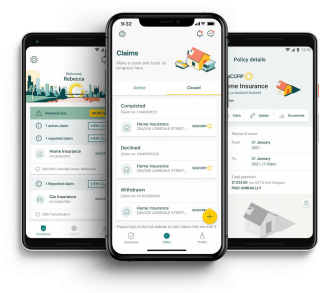
If you have an eligible policy#, the Suncorp Insurance App is full of self-service options to make your life easier.
Quickly lodge and track claims.
Receive real-time policy and claim notifications.
View and update your policy details and personal information.
Access your insurance documents.
Make renewal payments - even make a one-off manual payment for a missed monthly instalment.
Frequently asked questions
If your building is insured with us, we can arrange for one of our suppliers to attend the property and temporarily make it safe to prevent any further loss/damage.
It’s important that you don’t carry out any repairs without our consent unless you can’t contact us and you need to make emergency repairs to protect the home or contents or it’s necessary for health and safety reasons. If you must do emergency repairs to make the property safe before our supplier/assessor has attended, ensure that you take clear photos/videos of all damage including the source of damage (for instance, a hose or pipe that has burst) and provide these to our supplier /assessor. Do not dispose of any items, unless they pose a health risk, prior to our builder/assessor attending. If any items must be disposed of, ensure multiple clear photos are taken of the items prior to disposal. Ensure you obtain an itemised invoice for any work done and send it to us, so we can assess this as part of your claim.
If you find more damage or discover something else has been stolen, please make a note, take photos and let us know the next time we’re in touch. There’s no need to immediately reach out – we’ll work with you to include all details in your claim.
If a different part of your home is damaged by another insured event, please make a new claim online or in the Suncorp Insurance App.
You can easily pay your excess online or in the Suncorp Insurance App.
If any excess(es) applies to your claim, we’ll do one of the following:
- deduct the amount of the excess(es) from any cash payment we make
- require you to pay the amount of the excess(es) to us. We’ll let you know when and how to pay.
If paying directly to us, the easiest way to pay your excess online or in the Suncorp Insurance App.
If you’re unable to pay online, please let us know. We can provide you with alternative payment options such as BPAY or using a debit or credit card over the phone.
Upload documents to your claim in your My Suncorp Account or in the Suncorp Insurance App, or email them to myclaim@suncorp.com.au with your claim number in the subject line.
Learn more




The information is intended to be of general nature only. Subject to any rights you may have under any law, we do not accept any legal responsibility for any loss or damage, including loss of business or profits or any other indirect loss, incurred as a result of reliance upon the information. Please make your own enquiries.
# The Suncorp Insurance App is not available, or fully available, for all policy types or claim types. View the Suncorp Insurance App terms & conditions
Internet connection is required when using the Suncorp Insurance App. Normal data charges from your internet service provider will apply.